Programming and Operating System Concepts
Possible Exam Questions
Exam Questions and Answer Map
[PYQ year] = observed in that past paper; [likely] = pattern-based prediction. Rehearse the answer plan closed-book, then use the links to check the complete answer in this chapter.
-
Differentiate an algorithm and a flowchart; list the flowchart symbols. [5] — [likely]
-
Answer plan: Define algorithm (finite ordered steps) → define flowchart (graphical representation) → compare in a table (form, ease of modification, clarity) → draw/list standard symbols (oval, rectangle, diamond, parallelogram, arrow, connector).
-
Model answer: Algorithm, Flowchart, and Symbols
-
Write an algorithm and draw a flowchart for a given logic (e.g. read an 8-bit value from port A and write its complement to port B). [4+4] — [PYQ 2082]
-
Answer plan: State problem → write numbered algorithm steps (Start, Read A, B=NOT A, Write B, Stop) → draw flowchart using correct symbols → label each symbol → verify logic completeness.
-
Model answer: 8-Bit Port Complement Algorithm and Flowchart
-
Explain data types, variables and arrays in programming. [5] — [likely]
-
Answer plan: Define variable vs constant → list common data types (integer, float, char, string, boolean) → define array → give 1-D address formula \(B+i\times w\) → mention 2-D row-major formula → state advantages/limitations.
-
Model answer: Data Types, Variables, and Arrays
-
Explain the functions of an operating system. [5–10] — [likely]
-
Answer plan: Define OS → state its position (interface between user/apps and hardware) → list major functions: process management, memory management, file management, I/O management, security, UI → briefly explain process states and scheduling.
-
Model answer: Functions of an Operating System
-
What is assembly language? State its advantages and disadvantages. [5] — [likely]
-
Answer plan: Define assembly language (low-level, mnemonics) → explain key terms (opcode, operand, assembler, label) → list advantages (speed, hardware access, critical-section use) → list disadvantages (machine-dependent, hard to maintain, long development).
- Model answer: Assembly Language: Merits and Limitations
Model Answer — Algorithm, Flowchart, and Symbols [5 marks]
Exam-ready answer
An algorithm is a finite, ordered and unambiguous sequence of effective steps that accepts zero or more inputs, produces at least one output and terminates while solving a defined problem. A flowchart is the graphical representation of such logic using standard symbols joined by directed flow lines. The algorithm states what actions occur; the flowchart makes their sequence, decisions and loops visually traceable.
| Basis | Algorithm | Flowchart |
|---|---|---|
| Form | Numbered natural-language steps or pseudocode | Standard graphical symbols and arrows |
| Preparation/modification | Fast to write and edit | Redrawing may be needed after logic changes |
| Main strength | Precise detail suitable for coding and complexity analysis | Easy visual communication and branch tracing |
| Main limitation | Long logic may be hard to visualize | Large logic becomes crowded and page-dependent |
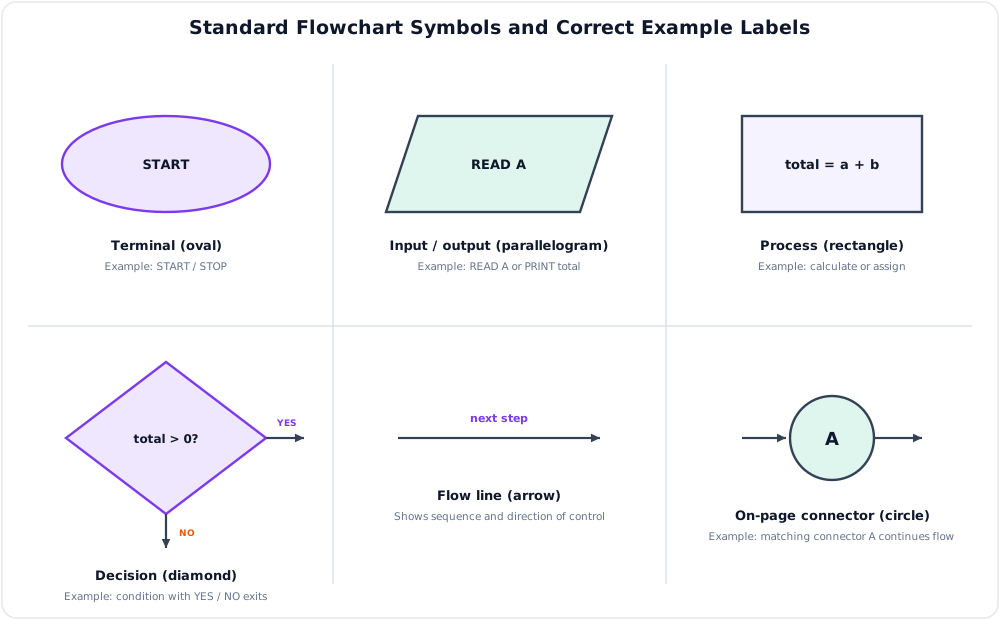
| Symbol | Meaning and correct use |
|---|---|
| Oval/rounded terminal | Start or Stop |
| Parallelogram | Input or output, such as Read/Print |
| Rectangle | Process, calculation or assignment |
| Diamond | Decision with labeled Yes/No or true/false exits |
| Arrow | Direction and sequence of control |
| Small circle | On-page connector avoiding crossed/long lines |
Pseudocode example: find the larger of two values.
Its flowchart uses terminal → input → decision; each decision branch performs an assignment, the branches rejoin before output, and Stop has no outgoing arrow. Both forms must be tested for equal values and boundary inputs. They describe logic rather than programming-language syntax and do not by themselves prove correctness, efficiency or safe input handling; desk checking, test cases and bounds validation are still necessary.
Practice target: 8–9 minutes; write both definitions, reproduce the six symbols, compare the forms, and include one short pseudocode example.
Model Answer — 8-Bit Port Complement Algorithm and Flowchart [4+4=8 marks, NTC 2082]
Exam-ready answer
(a) Algorithm [4 marks]
The input is one unsigned 8-bit word from Port A; every bit must be inverted and the resulting 8-bit word written to Port B. If the machine's bitwise NOT operates on a wider integer, masking is essential:
START
CONFIGURE Port A as INPUT
CONFIGURE Port B as OUTPUT
A <- READ Port A
A <- A AND 0xFF
B <- (NOT A) AND 0xFF
WRITE B to Port B
STOP
The two masks guarantee that only bits \(b_7\ldots b_0\) participate, so the output field is
(b) Flowchart [4 marks]
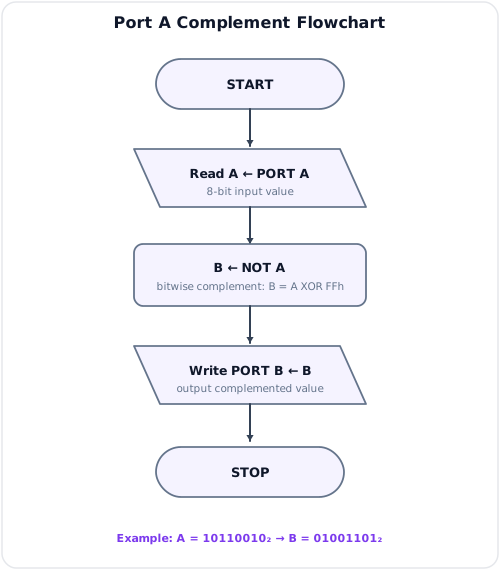
The flowchart uses terminal symbols for Start/Stop, parallelograms for port input/output, and a rectangle for B <- (NOT A) AND 0xFF; arrows give the exact execution order. Port-direction initialization may be performed once before the repeated acquisition loop on a real microcontroller.
Trace example: if Port A supplies
then each bit is inverted and
The edge cases are A=0x00 -> B=0xFF and A=0xFF -> B=0x00. Without AND 0xFF, a language using 16- or 32-bit signed integers may retain upper one-bits after NOT and produce a negative or oversized value. In hardware, the program must also use the correct port addresses, direction registers and voltage/interface limits; simultaneous asynchronous input changes may require latching or debouncing.
Practice target: 13–14 minutes; split space equally, keep the pseudocode textual, draw the referenced flowchart with correct symbols, and verify one binary example.
Model Answer — Data Types, Variables, and Arrays [5 marks]
Exam-ready answer
A data type specifies a value's representation, storage size/range and permitted operations. A variable is a named storage location whose value may change during execution, whereas a constant is a named value that the program must not modify after definition. Choosing an appropriate type prevents meaningless operations and controls memory use and numerical range.
| Type | Stored information | Example | Important limitation |
|---|---|---|---|
| Integer | Whole signed/unsigned number | count = 25 |
Fixed-width overflow |
| Real/floating point | Approximate fractional value | voltage = 3.3 |
Rounding error |
| Character | One encoded symbol | 'N' |
Encoding width varies |
| Boolean | True/false condition | isReady = true |
Only logical states |
| String | Sequence of characters | "NTC" |
Length and encoding must be managed |
An array is an indexed collection of same-type elements, normally stored in contiguous locations. For zero-based one-dimensional array A, base address \(B\), element width \(w\) bytes and index \(i\),
For row-major array A[R][N],
Example: if five 4-byte integers begin at address 1000, A[3] is at \(1000+3(4)=1012\). Indexed access is therefore \(O(1)\) and arrays compactly represent tables, buffers and matrices. Their limitations are fixed size in many languages, costly middle insertion/deletion, homogeneous elements and the need for valid indices. An unchecked index can corrupt memory or disclose data, so safe programs validate \(0\le i<R\) and \(0\le j<N\), use language bounds checks where available and avoid arithmetic overflow when calculating allocation size.
Practice target: 8–9 minutes; distinguish type, variable and constant, show the type table, and calculate one array address.
Model Answer — Functions of an Operating System [5–10 marks]
5-mark answer and 10-mark extension
For 5 marks — write this
An operating system (OS) is system software that acts as an interface between users/applications and computer hardware. It abstracts devices into convenient services, allocates resources fairly and safely, and provides the controlled environment in which programs execute.
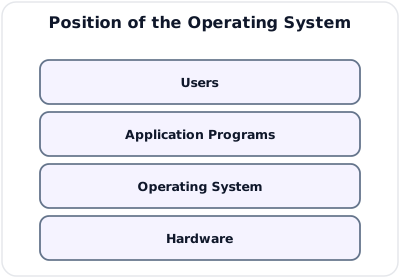
| Function | Main responsibilities |
|---|---|
| Process/CPU management | Create and terminate processes, schedule ready work, handle synchronization and inter-process communication |
| Memory management | Track and allocate RAM, provide paging/virtual memory, relocation and process protection |
| File/storage management | Organize files/directories, perform create/read/write/delete, permissions, free-space and recovery operations |
| Device/I/O management | Control devices through drivers, interrupts, buffering, caching and spooling |
| Security/protection | Authenticate users, authorize access, isolate processes, audit actions and enforce least privilege |
| User/service interface | Supply CLI/GUI and system calls; networking and error handling support applications |
Thus the OS is both a resource manager and an extended machine that hides hardware-specific details.
Add for a 10-mark variant
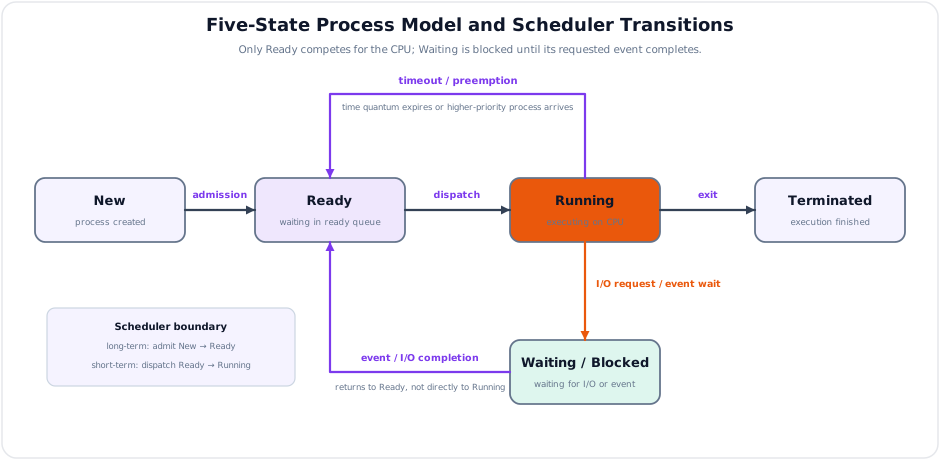
A process moves through well-defined states. The long-term scheduler admits New work to Ready; the short-term scheduler dispatches a Ready process to Running. A timeout/preemption returns it to Ready, an I/O request blocks it in Waiting, event completion returns it to Ready, and completion moves it to Terminated.
| CPU policy | Strength | Limitation |
|---|---|---|
| FCFS | Simple and fair by arrival | Long job can cause convoy effect |
| SJF | Minimum average waiting if burst is known | Burst prediction and starvation problem |
| Priority | Serves urgent work | Low-priority starvation; aging is needed |
| Round Robin | Responsive time sharing | Very small quantum increases context-switch overhead |
Useful scheduling measures are
For memory, the OS maintains per-process address spaces and page tables, allocates frames, handles page faults and reclaims pages. For files it maps names and offsets to storage blocks, maintains metadata and access permissions, and buffers I/O. Device drivers translate generic system calls into controller commands; interrupts report completion, while spooling lets several processes share a printer without direct conflict.
Example: when a user opens a protected file, the OS authenticates the process credentials, checks directory/file permissions, resolves the pathname, allocates a file descriptor, fetches blocks through the storage driver and page cache, then returns bytes through a system call. Concurrently it may preempt that process, run another and later restore registers from the saved process control block.
The OS must balance utilization, responsiveness, fairness and isolation. Deadlock, starvation, thrashing, driver failure and privilege escalation are limitations/risks. Process isolation, memory execute/write permissions, least-privilege accounts, secure boot, patching, access-control lists, logging, backups and quotas reduce them, but all consume resources and cannot compensate for faulty applications or failed hardware without redundancy.
Practice target: 9 minutes for the five-mark core or 17–18 minutes for the full answer; draw both OS layers and process states, then explain one end-to-end file request.
Model Answer — Assembly Language: Merits and Limitations [5 marks]
Exam-ready answer
Assembly language is a processor-specific low-level language in which mnemonic operation names and symbolic operands represent machine instructions. An assembler translates source statements into object/machine code, resolves labels to addresses and reports syntax or range errors. A typical source format is
For example, MOV R1, #5 loads an immediate constant, ADD R1, R2 names an opcode and register operands, and JNZ LOOP branches to a symbolic label when the zero flag is clear. A linker may then combine object modules and relocate addresses before loading.
| Advantages | Disadvantages |
|---|---|
| Direct control of registers, flags, memory and I/O ports | Instruction set, registers and syntax are machine-dependent |
| Compact, deterministic code for carefully optimized critical routines | More source statements and much longer development time |
| Precise interrupt, startup and device-control operations | Difficult debugging, maintenance and team readability |
| Can exploit instructions unavailable in a high-level language | Manual calling conventions and resource management invite errors |
Example application: a short interrupt service routine may save registers, read a device status port, acknowledge the interrupt and restore context with exact latency. Assembly is therefore appropriate for boot code, context switching, tiny embedded targets and measured performance-critical sections, but compilers are normally preferred for complete applications because they provide portability and optimization across large code bases.
Efficiency is not automatic: poor hand-written assembly may be slower than optimized compiled code. Unsafe pointer arithmetic, unchecked buffers and privileged instructions can corrupt memory or compromise the system, so interfaces, stack alignment, bounds and saved-register conventions must be documented and tested. The central trade-off is maximum hardware control versus portability, productivity and safety.
Practice target: 8–9 minutes; define assembler/opcode/operand/label, show one statement, and balance at least three advantages against three disadvantages.
Syllabus Focus
- Assembly language basics
- Flow charts and algorithms
- Variables, constants, data types, and arrays
- Operating system concepts
1. Programming Concepts
Likely Exam Question (5 marks)
"Define algorithm and flowchart. Why are they important in program development?"
Programming is the process of designing and writing instructions that a computer can execute to solve a problem.
Program Development Steps
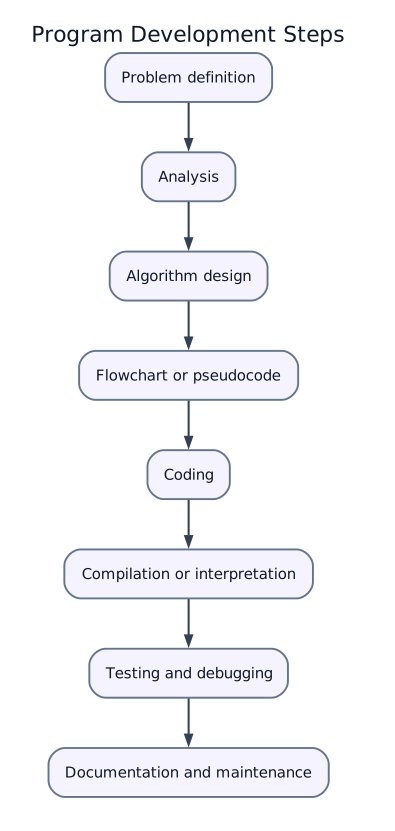
| Step | Purpose |
|---|---|
| Problem definition | Understand what must be solved |
| Analysis | Identify inputs, outputs, constraints, and processing |
| Algorithm design | Prepare step-by-step solution |
| Flowchart/pseudocode | Represent logic before coding |
| Coding | Write program in a programming language |
| Testing | Check correctness using test data |
| Debugging | Find and remove errors |
| Documentation | Explain code, design, and usage |
2. Algorithms
An algorithm is a finite, ordered set of unambiguous steps used to solve a particular problem.
Characteristics of a Good Algorithm
- Input: accepts zero or more inputs.
- Output: produces at least one result.
- Definiteness: every step is clear and unambiguous.
- Finiteness: terminates after a finite number of steps.
- Effectiveness: each step is simple and executable.
Example Algorithm: Find Largest of Three Numbers
1. Start
2. Read A, B, C
3. If A >= B and A >= C, then largest = A
4. Else if B >= A and B >= C, then largest = B
5. Else largest = C
6. Print largest
7. Stop
Algorithm Complexity
Algorithm efficiency is commonly measured by:
- Time complexity: amount of time taken as input size grows.
- Space complexity: amount of memory required as input size grows.
Common time complexities:
| Complexity | Meaning | Example |
|---|---|---|
| \(O(1)\) | Constant time | Access array element by index |
| \(O(\log n)\) | Logarithmic time | Binary search |
| \(O(n)\) | Linear time | Sequential search |
| \(O(n \log n)\) | Linearithmic time | Efficient sorting |
| \(O(n^2)\) | Quadratic time | Simple nested-loop sorting |
3. Flowcharts
A flowchart is a graphical representation of an algorithm using standard symbols and arrows to show sequence of operations.
Common Flowchart Symbols
| Symbol | Name | Use |
|---|---|---|
| Oval | Terminal | Start/Stop |
| Parallelogram | Input/Output | Read or print data |
| Rectangle | Process | Calculation or assignment |
| Diamond | Decision | Condition/branching |
| Arrow | Flow line | Direction of control flow |
| Small circle | Connector | Connects flow lines on same page |
Flowchart Control Structures
| Structure | Description |
|---|---|
| Sequence | Steps execute one after another |
| Selection | Decision selects one path, such as if-else |
| Iteration | Repeated execution, such as while/for loop |
Advantages of Flowcharts
- Easy to understand program logic.
- Helps detect logical errors before coding.
- Useful for documentation and communication.
- Helps convert problem logic into code.
PYQ: Read Port A and Write Its Complement to Port B
Past Exam Question (8 marks)
"A microprocessor reads an 8-bit binary value from port A and writes the complement of that value to port B. Write an algorithm and a flowchart." (NTC 2082)
Limitations
- Becomes complex for large programs.
- Modification is difficult when logic changes often.
- Does not show detailed implementation.
4. Variables, Constants, and Data Types
Likely Exam Question (5 marks)
"Differentiate between variable and constant. Explain common data types used in programming."
Variables
A variable is a named memory location whose value can change during program execution.
Examples:
Good variable names should be meaningful, such as totalMarks, radius, or studentCount.
Constants
A constant is a named value that does not change during program execution.
Examples:
Data Types
A data type defines the kind of value stored in a variable and the operations allowed on it.
| Data Type | Meaning | Example |
|---|---|---|
| Integer | Whole number | 25, -4 |
| Floating point/Real | Number with decimal part | 3.14, -0.25 |
| Character | Single symbol | 'A', '7' |
| String | Sequence of characters | "Nepal Telecom" |
| Boolean | True/false value | true, false |
| Array | Collection of same-type elements | marks[0], marks[1] |
Operators
| Category | Operators | Example |
|---|---|---|
| Arithmetic | +, -, *, /, % |
a + b |
| Relational | >, <, >=, <=, ==, != |
age >= 18 |
| Logical | AND, OR, NOT |
x > 0 AND y > 0 |
| Assignment | =, +=, -= |
count = count + 1 |
5. Arrays
An array is a collection of elements of the same data type stored in contiguous memory locations and accessed using an index.
One-Dimensional Array
If base address is \(B\), element size is \(w\) bytes, and indexing starts at 0, the address of A[i] is:
Two-Dimensional Array
A two-dimensional array represents tabular data such as matrix or marks table.
For row-major storage:
where \(N\) is the number of columns.
Advantages of Arrays
- Store many values using one variable name.
- Fast indexed access.
- Useful for lists, tables, matrices, buffers, and lookup tables.
Limitations
- Fixed size in many languages.
- Insertion and deletion in the middle can be costly.
- Usually stores same-type elements only.
6. Programming Errors
| Error Type | Meaning | Example |
|---|---|---|
| Syntax error | Violation of language grammar | Missing semicolon/bracket |
| Logical error | Program runs but gives wrong result | Wrong formula |
| Runtime error | Error during execution | Divide by zero, invalid memory access |
| Semantic error | Meaning of statement is wrong | Type mismatch |
Debugging is the process of finding and correcting errors in a program.
Common debugging techniques:
- Trace program step by step.
- Print/check intermediate values.
- Use breakpoints and debugger.
- Test boundary and invalid inputs.
7. Assembly Language
Likely Exam Question (10 marks)
"What is assembly language? Explain assembler, opcode, operand, and addressing modes."
Assembly language is a low-level programming language that uses symbolic mnemonics to represent machine instructions.
Example idea:
Assembly Language Terms
| Term | Meaning |
|---|---|
| Mnemonic | Symbolic instruction name, such as MOV, ADD, JMP |
| Opcode | Operation code that tells CPU what to do |
| Operand | Data or address used by the instruction |
| Label | Symbolic name for memory location or branch target |
| Assembler | Translator that converts assembly code into machine code |
| Machine code | Binary instructions directly executed by CPU |
Advantages of Assembly Language
- Faster and more memory-efficient than high-level language in critical sections.
- Direct access to registers, memory, and hardware.
- Useful for device drivers, embedded systems, interrupt routines, and boot code.
Disadvantages
- Machine-dependent.
- Difficult to write, debug, and maintain.
- Requires detailed knowledge of processor architecture.
- Longer development time.
High-Level Language vs Assembly Language
| Feature | High-Level Language | Assembly Language |
|---|---|---|
| Readability | Easier | Difficult |
| Portability | More portable | Processor-dependent |
| Hardware control | Limited/direct through libraries | Direct |
| Execution efficiency | Usually less direct | Very efficient when optimized |
| Translation | Compiler/interpreter | Assembler |
8. Operating System Concepts
Likely Exam Question (10 marks)
"Define operating system. Explain its major functions."
An operating system (OS) is system software that acts as an interface between users/applications and computer hardware. It manages resources and provides services for program execution.
Position of OS
Major Functions of Operating System
| Function | Description |
|---|---|
| Process management | Creates, schedules, and terminates processes |
| Memory management | Allocates/deallocates RAM and manages virtual memory |
| File management | Creates, stores, organizes, and protects files |
| I/O management | Controls devices through drivers and buffers |
| Security and protection | Controls access to resources |
| User interface | Provides CLI or GUI |
| Networking | Supports communication and resource sharing |
| Error handling | Detects and handles hardware/software errors |
Process and Thread
A process is a program in execution with its own address space, resources, and state.
A thread is the smallest unit of CPU execution inside a process. Multiple threads in the same process share memory and resources.
| Feature | Process | Thread |
|---|---|---|
| Resource ownership | Own address space/resources | Shares process resources |
| Creation overhead | Higher | Lower |
| Communication | Inter-process communication needed | Easier shared-memory communication |
| Failure isolation | Better | One faulty thread can affect process |
Process States
| State | Meaning |
|---|---|
| New | Process is being created |
| Ready | Waiting for CPU |
| Running | Currently executing |
| Waiting/Blocked | Waiting for I/O or event |
| Terminated | Execution completed |
CPU Scheduling
CPU scheduling decides which ready process gets the CPU.
Common scheduling algorithms:
| Algorithm | Idea | Feature |
|---|---|---|
| FCFS | First Come First Served | Simple, may cause convoy effect |
| SJF | Shortest Job First | Minimum average waiting time, needs burst prediction |
| Priority | Highest priority first | May cause starvation |
| Round Robin | Fixed time quantum per process | Good for time-sharing systems |
Memory Management
Operating systems manage memory using:
- Contiguous allocation: each process gets one continuous memory block.
- Paging: memory divided into fixed-size pages and frames.
- Segmentation: program divided into logical segments.
- Virtual memory: uses disk to extend apparent RAM.
File System
A file system organizes data into files and directories on storage devices.
Important file operations:
- Create, open, read, write, close, delete, rename.
- Access control and permissions.
- Directory management.
- Backup and recovery.
Types of Operating Systems
| Type | Description | Example |
|---|---|---|
| Batch OS | Jobs collected and executed in batches | Early mainframe systems |
| Time-sharing OS | Many users/processes share CPU interactively | Unix/Linux |
| Real-time OS | Responds within strict time limits | Embedded control systems |
| Distributed OS | Manages multiple networked computers | Distributed computing systems |
| Mobile OS | Designed for mobile devices | Android, iOS |
9. Quick Comparisons
Compiler vs Interpreter vs Assembler
| Feature | Compiler | Interpreter | Assembler |
|---|---|---|---|
| Input | High-level program | High-level program | Assembly program |
| Output | Machine/object code | Executes line by line | Machine/object code |
| Speed after translation | Fast | Slower | Fast |
| Error reporting | After compilation | During execution line by line | During assembly |
Algorithm vs Program
| Feature | Algorithm | Program |
|---|---|---|
| Form | Step-by-step logic | Code in a programming language |
| Machine dependence | Independent | Language/platform dependent |
| Executable directly | No | Yes after translation |
| Purpose | Design solution | Implement solution |
Flowchart vs Pseudocode
| Feature | Flowchart | Pseudocode |
|---|---|---|
| Representation | Graphical | Textual |
| Best for | Visualizing control flow | Writing detailed logic quickly |
| Modification | Harder | Easier |
Key Exam Points - Programming
- Algorithm must be finite, definite, effective, and produce output.
- Flowchart symbols: oval for start/stop, rectangle for process, diamond for decision, parallelogram for I/O.
- Variable value can change; constant value remains fixed.
- Array elements are accessed by index and usually stored contiguously.
- Assembly language uses mnemonics and is translated by an assembler.
- OS manages CPU, memory, files, devices, security, and user interface.