Cyber Security
Possible Exam Questions
Exam Questions and Answer Map
[PYQ year] = observed in that past paper; [likely] = pattern-based prediction. Rehearse the answer plan closed-book, then use the links to check the complete answer in this chapter.
-
Define cyber security (confidentiality, integrity, availability). [5] — [likely]
-
Answer plan: Define cyber security → introduce CIA triad → explain each goal (confidentiality, integrity, availability) with example control → mention additional goals (authentication, non-repudiation).
-
Model answer: Cyber Security and the CIA Triad
-
Differentiate virus, worm and Trojan horse. [5] — [likely]
-
Answer plan: Define each malware type → compare in table: host requirement, user action, spread mechanism, main risk → give one prevention focus per type.
-
Model answer: Virus, Worm, and Trojan Horse
-
Explain a digital signature and how it provides authentication and integrity. [5–10] — [likely]
-
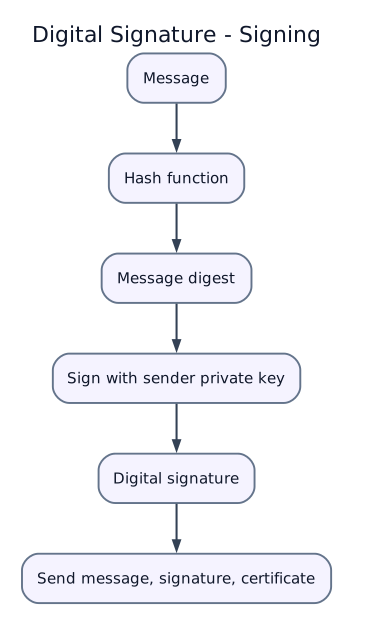
Answer plan: Define digital signature → describe creation (hash message → encrypt digest with private key) → describe verification (hash received message → decrypt signature with public key → compare) → list services: authentication, integrity, non-repudiation.
-
Model answer: Digital Signature Creation and Verification
-
Differentiate hacking and cracking; differentiate spam and phishing. [5] — [likely]
-
Answer plan: Define hacking (may be authorized) vs cracking (unauthorized, malicious) → compare intent, outcome, example → define spam (unsolicited bulk) vs phishing (credential theft) → state controls for each.
-
Model answer: Hacking vs Cracking; Spam vs Phishing
-
Explain common cyber attacks and their countermeasures. [5–10] — [likely]
-
Answer plan: List major threats (malware, phishing, DoS, MitM, password attack, social engineering) → for each state mechanism and impact → list technical countermeasures (antivirus, firewall, IDS, encryption, MFA, patching) → mention user-level practices.
- Model answer: Common Cyber Attacks and Countermeasures
Model Answer — Cyber Security and the CIA Triad [5 marks]
Exam-ready answer
Cyber security is the coordinated protection of computers, networks, software, services, data and users against unauthorized access, alteration, disclosure, disruption, destruction or theft. Its basic objectives are summarized by the CIA triad.
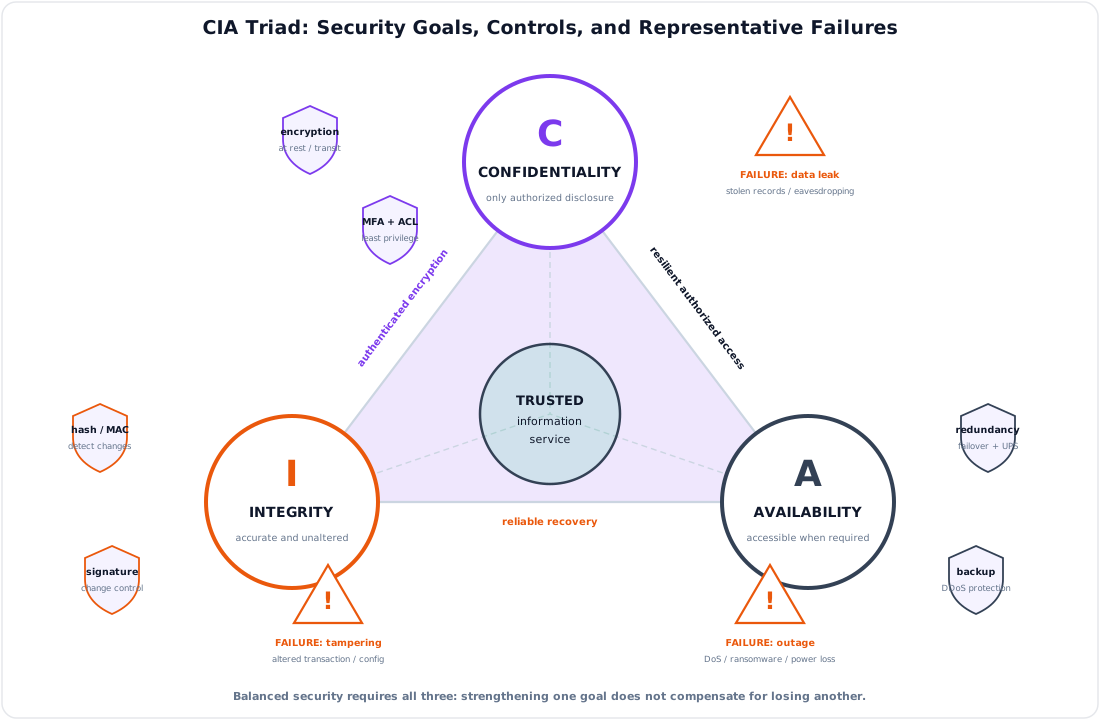
| Objective | Meaning | Failure example | Representative controls |
|---|---|---|---|
| Confidentiality | Information is disclosed only to authorized subjects | Customer records are read by an intruder | Encryption, authentication, access control and data classification |
| Integrity | Information and systems remain accurate, complete and changed only in authorized ways | An account balance or software file is altered | Hashes/MACs, digital signatures, permissions, validation and audit logs |
| Availability | Authorized users receive required service and data when needed | DDoS, hardware failure or ransomware makes a portal unavailable | Redundancy, capacity protection, patching, backups and disaster recovery |
Example: an online billing system encrypts subscriber data and limits database roles for confidentiality; digitally signs software updates and logs transactions for integrity; and uses replicated servers, UPS power, monitoring and tested backups for availability. Improving one objective can affect another: strict checks may add delay, while unrestricted redundancy may create more copies to protect, so controls must follow risk and service requirements.
Related goals are authentication (verify identity), authorization (grant permitted actions), accountability (trace actions) and non-repudiation (strong evidence prevents a party from plausibly denying an action). No single product provides all goals; policy, trained people, secure processes and layered technical controls are required, followed by monitoring and incident response.
Practice target: 8–9 minutes; define cyber security, give meaning, failure and at least two controls for each CIA objective, then add the related goals.
Model Answer — Virus, Worm, and Trojan Horse [5 marks]
Exam-ready answer
Malware is software or code intentionally designed to disrupt, damage, spy, steal or obtain unauthorized control. A virus inserts or attaches its code to a host file, program, document macro or boot area and normally spreads when the infected host is executed. A worm is a stand-alone, self-replicating program that automatically spreads between systems, commonly by exploiting a network vulnerability or weak credential. A Trojan horse pretends to be useful or legitimate software so that a user installs/runs it; it may open a backdoor or steal data but does not define itself by self-replication.
| Feature | Virus | Worm | Trojan horse |
|---|---|---|---|
| Host file required | Usually yes | No | No; disguised application is the carrier |
| Initial user action | Often opening/running infected content | May need none after first foothold | Usually tricked download/install |
| Propagation | Infected files, media or macros | Automatic network scanning/exploitation | Social engineering, fake/cracked software |
| Typical impact | File infection/corruption and payload execution | Rapid spread, resource exhaustion, further payload delivery | Credential theft, remote access or covert persistence |
| Prevention focus | Antivirus, macro/media control, trusted files | Rapid patching, firewalling and segmentation | Allow-listing, signed software and user verification |
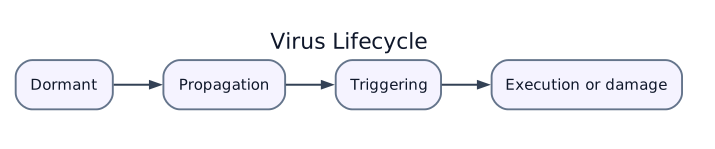
A virus may pass through dormant, propagation, triggering and execution/damage stages as shown; a worm often compresses propagation into rapid automated scanning, while a Trojan depends chiefly on deception. Example: an infected document macro is a virus vector, an exploit that copies itself to every vulnerable server is a worm, and a fake utility installing a backdoor is a Trojan.
Controls overlap: keep systems patched, use endpoint detection, least privilege, filtered email/web downloads, offline tested backups and network monitoring. Antivirus signatures alone may miss new or polymorphic malware, and labels can overlap when one campaign uses a Trojan to install a worm, so behavior, delivery and replication mechanism must all be examined.
Practice target: 8–9 minutes; define all three and compare host, user action, propagation, impact and one prevention focus.
Model Answer — Digital Signature Creation and Verification [5–10 marks]
5-mark answer and 10-mark extension
For 5 marks — write the digital-signature core
A digital signature is a public-key cryptographic value bound to a particular message and signer. Let message be \(M\), secure hash be \(H\), signer's private key be \(SK_A\), corresponding public key be \(PK_A\), and signature be \(S\). Creation is
The sender transmits \(M\), \(S\) and normally a certificate identifying \(PK_A\).
The receiver independently computes \(h_1=H(M)\) and runs the signature algorithm's public-key verification:
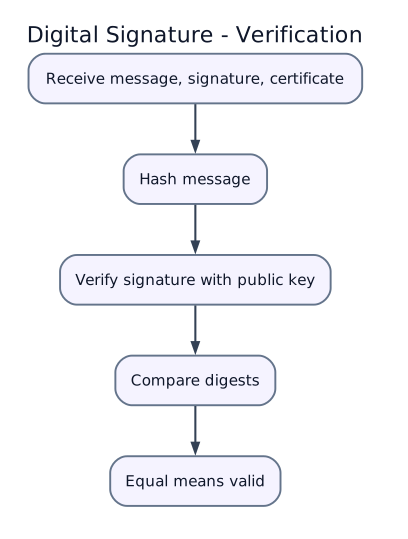
A valid result provides integrity because any message change alters the digest, origin authentication because only the holder of the private key should produce the signature, and evidence supporting non-repudiation when key ownership and procedures are trustworthy. A digital signature does not provide confidentiality: the message remains readable unless it is separately encrypted.
Add for a 10-mark variant — PKI and assurance
A cryptographic hash compresses arbitrary-length \(M\) to a fixed-length digest and should resist preimage and collision attacks. Signing the digest is efficient and binds the signature to every message bit. Algorithms such as RSA-PSS, ECDSA or EdDSA implement signing differently; "encrypt the hash with the private key" is only a simplified RSA-style explanation, not a general definition of every signature algorithm.
| Component | Function | Required control |
|---|---|---|
| Private key | Creates signatures | Generate securely; keep secret in protected hardware/software; never transmit |
| Public key/certificate | Enables verification and binds key to identity | Validate CA chain, identity, purpose, expiry and revocation status |
| Hash/signature algorithm | Binds exact content to signature | Use approved collision-resistant algorithms and parameters |
| Timestamp/audit record | Shows when signing occurred and preserves evidence | Trusted timestamp, logs and long-term validation data |
Verification procedure: (1) obtain the signer's certificate through a trusted channel; (2) validate the certification path, validity period, key usage and revocation status; (3) parse the signed data and algorithm parameters unambiguously; (4) hash exactly the received signed bytes; (5) verify \(S\) with \(PK_A\); and (6) accept only if both signature and policy/identity checks succeed.
Example: a software vendor publishes an update and signature. The customer verifies the vendor certificate and signature before installation. If one byte of the update is changed, \(H(M')\ne H(M)\) and verification fails. If an attacker substitutes both a malicious file and an untrusted public key, bare mathematics may verify, but certificate validation must reject the false identity.
| Mechanism | Main service | Shared secret? | Recipient can prove origin to a third party? |
|---|---|---|---|
| Encryption | Confidentiality | Symmetric or recipient-key arrangement | Not by itself |
| MAC | Integrity/authentication | Yes | Usually no; both parties know the MAC key |
| Digital signature | Integrity, origin authentication, non-repudiation evidence | No shared signing secret | Potentially, with valid PKI and key custody |
Limitations are private-key theft, weak random numbers, expired/revoked certificates, compromised certificate authorities, ambiguous document formats and long-term algorithm aging. Hardware-backed keys, MFA for signing, revocation checking, trusted timestamps, secure canonical formats, key rotation and incident response reduce these risks. A valid signature proves the signed bytes and key relationship; it does not prove that the document is true, safe or willingly understood by the signer.
Practice target: 9 minutes for the five-mark core or 17–18 minutes for the full answer; draw both flows and explicitly write "no confidentiality by itself."
Model Answer — Hacking vs Cracking; Spam vs Phishing [5 marks]
Exam-ready answer
Hacking broadly means exploring, modifying or testing computer systems and weaknesses; its legality and ethics depend on authorization, scope and intent. Cracking means unauthorized, malicious defeat of security or software protection to steal, damage, disrupt or bypass controls. Therefore an authorized penetration tester is a hacker in the neutral/ethical sense, while breaking an account password or licence protection without permission is cracking.
| Basis | Ethical/authorized hacking | Cracking |
|---|---|---|
| Permission | Written authorization and defined scope | Absent |
| Purpose | Find and help remediate weaknesses | Theft, damage, misuse or protection bypass |
| Method/output | Controlled tests, evidence and responsible report | Covert exploitation and unauthorized persistence |
| Legal status | Lawful only within permission/rules | Unlawful and unethical |
Spam is unsolicited bulk electronic communication, usually sent to many recipients for promotion, fraud or malware delivery. Phishing is deceptive communication impersonating a trusted party to make a victim disclose credentials/payment data, open malware or approve an action. Phishing may be bulk, spear-targeted or carried by email/SMS/voice; not every spam message is phishing, and a targeted phishing message need not be bulk spam.
| Threat | Main indicator | Main controls |
|---|---|---|
| Spam | Unrequested high-volume/repetitive mail | Reputation/content filters, SPF/DKIM/DMARC, unsubscribe/abuse controls |
| Phishing | Urgent impersonation, false login/payment link or attachment | User verification, URL/domain checks, MFA, secure email gateway and out-of-band confirmation |
Users should not conduct security tests without permission, click suspicious links or submit secrets after following an unsolicited prompt. Organizations should log authorized tests, restrict scope, filter messages and make reporting easy; filtering can have false positives and cannot replace user and identity controls.
Practice target: 8–9 minutes; devote one comparison to authorization/intent and one to bulk messaging versus deceptive credential/action theft.
Model Answer — Common Cyber Attacks and Countermeasures [5–10 marks]
5-mark answer and 10-mark extension
For 5 marks — write the attack-control core
A cyber attack is a deliberate attempt to violate confidentiality, integrity or availability by exploiting technology, configuration or people. Countermeasures should be selected for the attack mechanism rather than listed without a mapping.
| Attack | Mechanism and impact | Direct countermeasures |
|---|---|---|
| Malware/ransomware | Malicious code steals, damages or encrypts data | Patching, allow-listing/EDR, least privilege, segmentation and offline tested backup |
| Phishing/social engineering | Deception obtains credentials or unsafe action | Awareness, secure email filtering, MFA and out-of-band verification |
| Password attacks | Brute force, spraying or reused-credential stuffing | Unique passphrases, password manager, rate limiting, MFA and breached-password checks |
| DoS/DDoS | Floods/exhausts links, hosts or application resources | Rate limiting, upstream scrubbing/CDN, capacity, filtering and resilient replicas |
| Man-in-the-middle | Intercepts or alters communication | TLS/VPN, certificate validation, secure Wi-Fi and mutual authentication where needed |
No one control stops every attack; prevention, detection, response and recovery must work together.
Add for a 10-mark variant — layered defense and response
Defense in depth places independent controls at successive trust boundaries so failure of one layer does not expose the final asset. Internet traffic first meets edge filtering and DDoS protection; public services are isolated in a DMZ; an internal firewall/IDS/IPS separates trusted networks; endpoints use hardening/EDR; identity systems enforce least privilege and MFA; SIEM/logging detects anomalies; and isolated immutable backups support recovery.
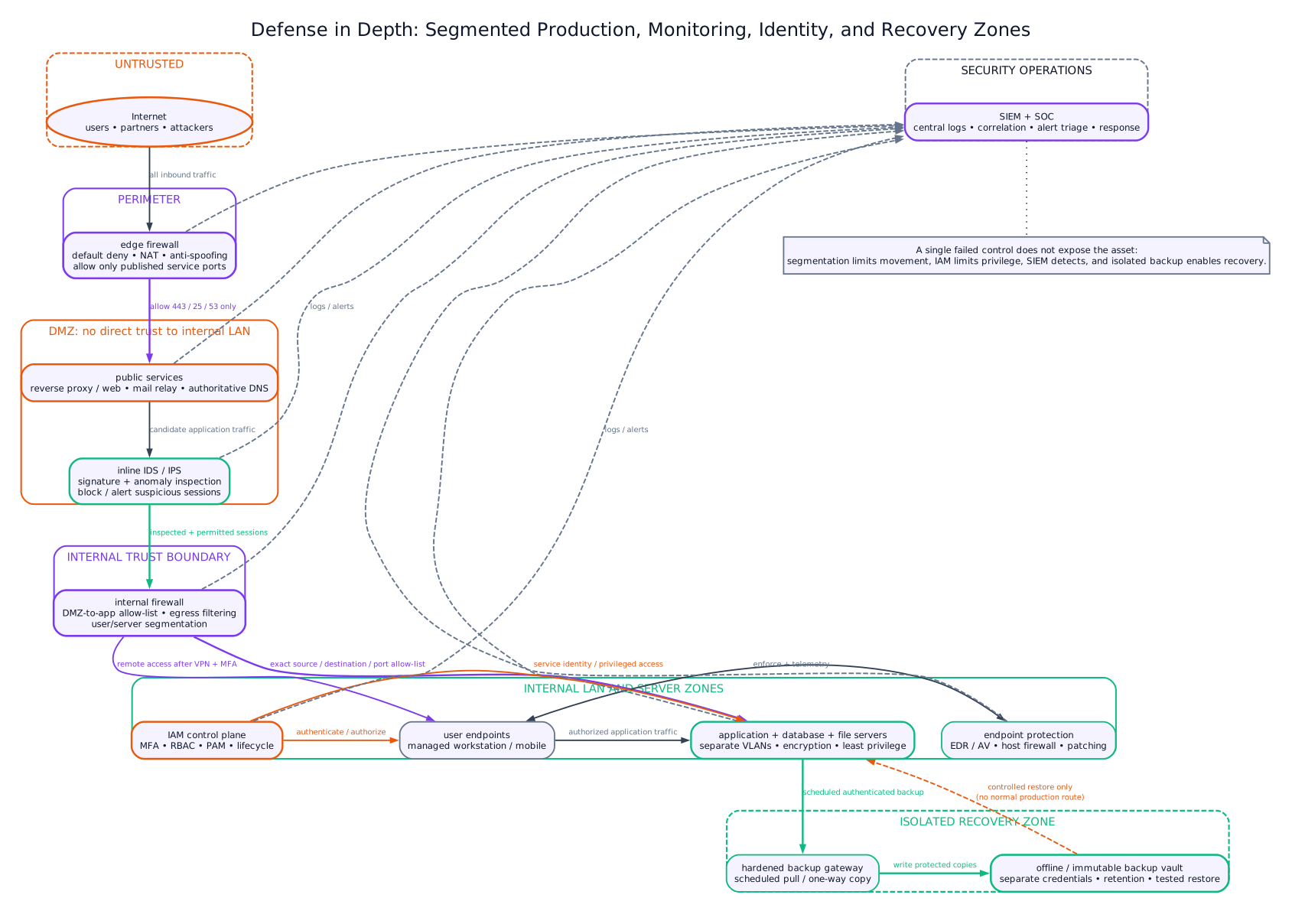
Additional attack-control mappings are:
| Attack | Security objective at risk | Layered response |
|---|---|---|
| Web injection | Confidentiality/integrity of database | Parameterized queries, input validation, least-privilege DB role, WAF and code review |
| Vulnerability exploitation | All CIA goals | Asset inventory, risk-based patching, hardening, scanning and segmentation |
| Insider misuse | Confidentiality/integrity | Least privilege, separation of duties, DLP, immutable logs and review |
| Supply-chain compromise | Integrity/authenticity of software | Signed releases, dependency/SBOM review, reproducible provenance and sandboxing |
| DNS/cache spoofing | Redirected traffic and credential theft | Randomized/validated resolution, DNSSEC where supported, TLS certificate checks |
Example attack chain: a phishing email captures a reused password; the attacker logs in, moves laterally and launches ransomware. Email filtering may block delivery, MFA can stop password-only login, segmentation restricts lateral movement, EDR detects encryption behavior, and an offline immutable backup enables restoration. Logging across these layers supplies the timeline for containment and account/key rotation.
An incident procedure is: identify and triage alerts; contain affected accounts/hosts; preserve evidence; eradicate malware and close the exploited weakness; recover from known-good backups; monitor for recurrence; notify required parties; and incorporate lessons into controls. Recovery point objective (RPO) limits acceptable data loss, while recovery time objective (RTO) limits acceptable service-restoration time.
Controls have limitations: signatures miss unknown malware, firewalls cannot correct authorized misuse, MFA can be phished or fatigue-abused, encryption does not protect a compromised endpoint, and backups fail if untested or reachable by ransomware. Continuous asset inventory, patching, exercises, metrics, user reporting and risk review are therefore necessary. Layering should reduce common-mode failure, not merely duplicate products with the same blind spot.
Practice target: 9 minutes for the five-mark mapping or 18 minutes for the full answer; show the layered figure, one attack chain and the complete incident-response sequence.
Syllabus Focus
- Digital signature
- Spam
- Virus and worm
- Hacking and cracking
1. Cyber Security Overview
Likely Exam Question (5 marks)
"Define cyber security. Explain the CIA triad."
Cyber security is the practice of protecting computers, networks, software, data, and users from unauthorized access, misuse, damage, disruption, or theft.
CIA Triad
Cyber security is commonly based on three main goals:
| Goal | Meaning | Example Control |
|---|---|---|
| Confidentiality | Only authorized users can access information | Encryption, access control |
| Integrity | Data remains accurate and unaltered | Hashing, digital signature |
| Availability | Systems and data remain accessible when needed | Backup, redundancy, DDoS protection |
Other Security Goals
| Goal | Meaning |
|---|---|
| Authentication | Verifying identity of user/system |
| Authorization | Granting permitted access after authentication |
| Accountability | Actions can be traced to responsible users |
| Non-repudiation | Sender cannot deny sending a message/transaction |
2. Common Cyber Threats
| Threat | Description |
|---|---|
| Malware | Malicious software such as virus, worm, trojan, ransomware |
| Phishing | Fraudulent attempt to steal credentials or sensitive data |
| Spam | Unwanted bulk messages, often used for fraud/malware |
| Password attack | Guessing, brute force, credential stuffing |
| Man-in-the-middle | Attacker intercepts communication |
| Denial of Service | Makes service unavailable by overload |
| Social engineering | Manipulating people to reveal information or perform unsafe action |
| Insider threat | Threat from authorized user misusing access |
3. Malware
Malware means malicious software designed to damage, disrupt, spy, steal, or gain unauthorized control.
Types of Malware
| Type | Description | Key Feature |
|---|---|---|
| Virus | Attaches to a host file/program and spreads when executed | Needs host/user action |
| Worm | Self-replicates across networks without host file | Spreads automatically |
| Trojan horse | Disguises as legitimate software | Tricks user into installing |
| Ransomware | Encrypts/locks data and demands payment | Extortion |
| Spyware | Secretly monitors user activity | Data theft/surveillance |
| Adware | Shows unwanted advertisements | Annoyance/tracking |
| Rootkit | Hides attacker presence and gives privileged access | Stealth |
| Keylogger | Records keystrokes | Credential theft |
4. Computer Virus
Likely Exam Question (5 marks)
"What is a computer virus? Explain its types and preventive measures."
A computer virus is malicious code that attaches itself to a legitimate program, file, or boot sector and replicates when the infected host is executed or opened.
Virus Life Cycle
| Stage | Meaning |
|---|---|
| Dormant | Virus remains inactive until condition occurs |
| Propagation | Copies itself to other files/systems |
| Triggering | Specific event activates payload |
| Execution | Performs malicious action |
Types of Virus
| Type | Description |
|---|---|
| File virus | Infects executable files |
| Boot sector virus | Infects boot record of storage device |
| Macro virus | Infects macro-enabled documents |
| Multipartite virus | Infects both files and boot sector |
| Polymorphic virus | Changes its code/signature to avoid detection |
| Resident virus | Stays in memory and infects files during operation |
Symptoms of Virus Infection
- Slow system performance.
- Frequent crashes or unusual errors.
- Files missing, corrupted, or renamed.
- Unwanted pop-ups or unknown programs.
- Antivirus disabled unexpectedly.
- Storage/network activity without reason.
Prevention
- Use updated antivirus/anti-malware software.
- Keep OS and applications patched.
- Avoid unknown attachments and pirated software.
- Disable unnecessary macros.
- Use least-privilege accounts.
- Keep regular offline/cloud backups.
- Scan removable media before use.
5. Worm
Likely Exam Question (5 marks)
"Differentiate between virus and worm."
A worm is self-replicating malware that spreads automatically over networks by exploiting vulnerabilities or weak credentials. Unlike a virus, it does not need to attach to a host file.
Worm Characteristics
- Self-contained program.
- Spreads without user action after initial infection.
- Consumes bandwidth and system resources.
- May install backdoors or deliver other malware.
- Often exploits unpatched network services.
Virus vs Worm
| Feature | Virus | Worm |
|---|---|---|
| Host file | Requires host file/program | Does not require host file |
| Spread | Usually needs user action | Spreads automatically |
| Main path | Files, documents, boot sector | Network vulnerabilities |
| Impact | File corruption, payload execution | Network congestion, rapid propagation |
| Prevention focus | Safe files, antivirus, macro control | Patching, firewall, network segmentation |
6. Spam
Likely Exam Question (5 marks)
"What is spam? How can spam be controlled?"
Spam is unsolicited bulk electronic communication, commonly e-mail, sent to many recipients without permission.
Common Forms of Spam
| Form | Description |
|---|---|
| E-mail spam | Bulk unwanted mail |
| SMS spam | Unwanted promotional/fraud messages |
| Social media spam | Fake links, comments, messages |
| Comment spam | Unwanted links in blogs/forums |
| Messaging app spam | Bulk messages in chat platforms |
Dangers of Spam
- Phishing and credential theft.
- Malware links or attachments.
- Financial fraud and scams.
- Wastes bandwidth, storage, and user time.
- Can reduce trust in communication systems.
Spam Control Methods
| Method | Description |
|---|---|
| Spam filter | Detects and moves spam to junk folder |
| Blacklist | Blocks known spam senders/IPs/domains |
| Whitelist | Allows trusted senders only |
| SPF | Checks whether sending server is authorized for domain |
| DKIM | Uses cryptographic signature to verify mail origin/integrity |
| DMARC | Builds policy using SPF/DKIM results |
| User awareness | Avoid clicking suspicious links/attachments |
7. Hacking and Cracking
Likely Exam Question (10 marks)
"Differentiate between hacking and cracking. Explain ethical hacking."
Hacking
Hacking is the act of finding and using weaknesses in computer systems or networks. The word can be neutral; it depends on authorization and intent.
Cracking
Cracking is unauthorized and malicious breaking into systems, software, or accounts to steal, damage, bypass protection, or misuse resources.
Hacker Types
| Type | Description |
|---|---|
| White-hat hacker | Authorized security professional; improves security |
| Black-hat hacker | Unauthorized malicious attacker |
| Gray-hat hacker | Acts without full authorization but may not intend direct harm |
| Script kiddie | Uses existing tools without deep technical knowledge |
| Hacktivist | Attacks for political/social cause |
| Insider | Authorized user misusing access |
Hacking vs Cracking
| Feature | Hacking | Cracking |
|---|---|---|
| Authorization | May be authorized or unauthorized | Unauthorized |
| Intent | Can be learning/security improvement | Malicious or illegal |
| Outcome | Vulnerability discovery, system improvement | Theft, damage, bypass, misuse |
| Example | Penetration testing with permission | Breaking password/license protection |
Ethical Hacking
Ethical hacking is authorized security testing performed to identify vulnerabilities before attackers exploit them.
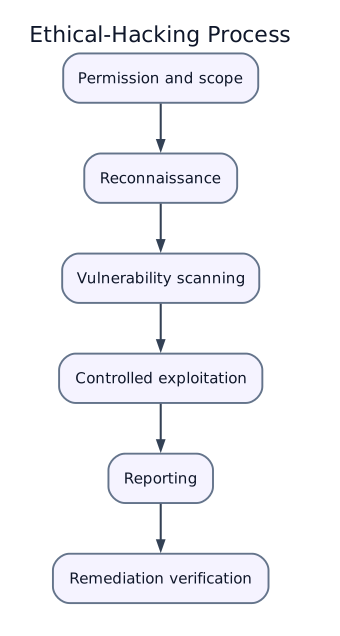
Basic ethical hacking process:
Important principles:
- Obtain written permission.
- Define scope and rules.
- Avoid unnecessary damage or disruption.
- Protect confidential data.
- Report findings responsibly.
8. Digital Signature
Likely Exam Question (10 marks)
"Explain digital signature. How does it provide authentication, integrity, and non-repudiation?"
A digital signature is a cryptographic mechanism used to verify the authenticity and integrity of a digital message, document, or transaction.
It is based on public key cryptography and a hash function.
Key Concepts
| Term | Meaning |
|---|---|
| Hash function | Produces fixed-size message digest from data |
| Private key | Secret key used by sender to sign |
| Public key | Publicly shared key used by receiver to verify |
| Certificate | Digital document binding public key to identity |
| CA | Certificate Authority that issues certificates |
Digital Signature Creation
Digital Signature Verification
Security Services Provided
| Service | How Digital Signature Helps |
|---|---|
| Authentication | Verifies signer identity through public key/certificate |
| Integrity | Any message change changes the hash, making verification fail |
| Non-repudiation | Signer cannot easily deny signing because private key was used |
Digital Signature vs Digital Certificate
| Feature | Digital Signature | Digital Certificate |
|---|---|---|
| Purpose | Verifies message/document | Verifies identity and public key ownership |
| Created by | Sender using private key | Certificate Authority |
| Contains | Signature value/hash encryption result | Public key, identity, CA signature, validity |
| Used for | Integrity, authentication, non-repudiation | Trust in public key |
Digital Signature vs Electronic Signature
| Feature | Digital Signature | Electronic Signature |
|---|---|---|
| Basis | Cryptography | Any electronic indication of consent |
| Security | Strong integrity/authentication | Depends on method |
| Verification | Public key and certificate | May be visual/log-based |
| Example | Signed PDF with certificate | Typed name in form |
9. Basic Cryptography
Cryptography protects information by transforming readable data into unreadable form and back using keys.
Encryption Terms
| Term | Meaning |
|---|---|
| Plaintext | Original readable data |
| Ciphertext | Encrypted unreadable data |
| Encryption | Plaintext to ciphertext |
| Decryption | Ciphertext to plaintext |
| Key | Secret/public value used in cryptographic operation |
Symmetric vs Asymmetric Cryptography
| Feature | Symmetric Key | Asymmetric/Public Key |
|---|---|---|
| Keys | Same key for encryption/decryption | Public key and private key pair |
| Speed | Faster | Slower |
| Key distribution | Difficult | Easier public key sharing |
| Use | Bulk data encryption | Digital signature, key exchange |
| Examples | AES, DES idea | RSA, ECC idea |
Hashing
A hash function converts data of any size into a fixed-size digest.
Properties:
- One-way: difficult to recover original data.
- Deterministic: same input gives same output.
- Collision-resistant: difficult to find two inputs with same hash.
- Avalanche effect: small input change gives very different hash.
Uses: password storage, file integrity checking, digital signatures.
10. Security Controls and Good Practices
Technical Controls
| Control | Purpose |
|---|---|
| Antivirus/EDR | Detects and blocks malware |
| Firewall | Filters network traffic |
| IDS/IPS | Detects/prevents suspicious network activity |
| Encryption | Protects confidentiality of data |
| Backup | Enables recovery after loss/ransomware |
| Patch management | Fixes known vulnerabilities |
| Multi-factor authentication | Adds extra login protection |
| Access control | Limits permissions to required resources |
User-Level Practices
- Use strong, unique passwords.
- Enable multi-factor authentication.
- Avoid suspicious links and attachments.
- Update operating system and applications.
- Download software only from trusted sources.
- Lock devices and avoid unattended sessions.
- Back up important data regularly.
- Verify website HTTPS before entering sensitive data.
Strong Password Guidelines
- Long passphrases are better than short complex strings.
- Do not reuse passwords across accounts.
- Avoid personal information and dictionary words alone.
- Use a password manager when possible.
- Change passwords immediately after suspected compromise.
11. Quick Comparisons
Authentication vs Authorization
| Feature | Authentication | Authorization |
|---|---|---|
| Meaning | Verifies identity | Determines permissions |
| Question | Who are you? | What are you allowed to do? |
| Example | Password, OTP, biometric | Read/write/admin access |
Virus vs Worm vs Trojan
| Feature | Virus | Worm | Trojan |
|---|---|---|---|
| Replication | Attaches to host file | Self-replicates | Usually does not self-replicate |
| User action | Often required | Not required after infection | User is tricked into installing |
| Spread | Files/documents/removable media | Network | Social engineering/downloads |
| Main risk | File infection/damage | Rapid network spread | Backdoor/data theft |
Encryption vs Hashing vs Digital Signature
| Feature | Encryption | Hashing | Digital Signature |
|---|---|---|---|
| Purpose | Confidentiality | Integrity/fingerprint | Authentication, integrity, non-repudiation |
| Reversible | Yes, with key | No | Verification only |
| Input/output | Plaintext to ciphertext | Data to digest | Digest signed with private key |
| Key used | Symmetric/asymmetric key | No key for basic hash | Private/public key pair |
Key Exam Points - Cyber Security
- CIA triad: confidentiality, integrity, availability.
- Virus attaches to host file; worm spreads automatically over network.
- Spam is unwanted bulk communication and may carry phishing or malware.
- Cracking is unauthorized malicious breaking into systems; ethical hacking requires permission and scope.
- Digital signature uses hash + sender private key; receiver verifies using sender public key.
- Digital signature provides authentication, integrity, and non-repudiation, not confidentiality by itself.