Internet and Networking
Possible Exam Questions
Exam Questions and Answer Map
[PYQ year] = observed in that past paper; [likely] = pattern-based prediction. Rehearse the answer plan closed-book, then use the links to check the complete answer in this chapter.
-
Differentiate LAN, MAN and WAN. [5] — [likely]
-
Answer plan: Define each (coverage, ownership, speed, example) → present comparison table (coverage, ownership, speed, delay, example) → mention PAN for context.
-
Model answer: LAN, MAN, and WAN
-
Compare network topologies (bus, star, ring, mesh). [5] — [likely]
-
Answer plan: Define topology → describe each topology (bus, star, ring, mesh) with diagram idea → list advantages and disadvantages of each → state modern LANs use star with switches.
-
Model answer: Bus, Star, Ring, and Mesh Topologies
-
Explain IP addressing (IPv4 classes) and the role of DNS, URL, HTTP and FTP. [5–10] — [likely]
-
Answer plan: Define IP address → describe IPv4 (32-bit, dotted decimal) → mention classes/subnet → define DNS (name-to-IP) → define URL (parts: scheme, host, path) → state HTTP/HTTPS role → state FTP role and ports.
-
Model answer: IP Addressing and Internet Naming/Application Protocols
-
Differentiate a router, a switch and a hub. [5] — [likely]
-
Answer plan: Define each device → state OSI layer of operation → explain function (hub repeats, switch uses MAC, router uses IP) → compare collision/broadcast domain behavior → give use cases.
-
Model answer: Hub, Switch, and Router
-
Explain web, email and print servers. [5] — [likely]
-
Answer plan: Define server (provides services to clients) → describe web server (hosts sites, HTTP/HTTPS) → describe email server (SMTP send, POP3/IMAP retrieve) → describe printer server (manages print queues) → mention client-server model.
- Model answer: Web, Email, and Print Servers
Model Answer — LAN, MAN, and WAN [5 marks]
Exam-ready answer
Computer networks are classified partly by geographical scope and administrative ownership. A LAN (Local Area Network) connects devices within a limited site such as a room, building or campus. A MAN (Metropolitan Area Network) interconnects sites across a town or city. A WAN (Wide Area Network) connects networks over regions, countries or continents, normally using carrier infrastructure and routed links.
| Basis | LAN | MAN | WAN |
|---|---|---|---|
| Typical coverage | Building/campus | City or metropolitan region | National to global |
| Ownership | Usually one home/organization | Municipality, operator or consortium | Multiple telecom operators/ISPs and organizations |
| Common technology | Ethernet and Wi-Fi | Metro Ethernet, fiber rings | MPLS/IP, leased lines, microwave, submarine/satellite links |
| Delay/error exposure | Usually lowest | Intermediate | Usually highest due to distance and many hops |
| Example | Nepal Telecom office network | Fiber linking branches across Kathmandu | Operator backbone connecting provinces; the Internet |
Example: PCs and printers inside one office form a LAN; connecting several city exchanges creates a MAN; routing traffic from that city to international networks uses a WAN. A PAN is still smaller, such as Bluetooth between a phone and headset.
LANs generally permit high capacity and direct local administration, while MAN/WAN designs require routing, service-level agreements, redundancy and stronger encryption across untrusted or shared facilities. These categories are descriptive, not fixed speed classes: a modern fiber WAN may be faster than an old LAN, and a campus network may span several kilometers. Each site should also have a bounded failure/security domain through VLANs and routers so that one broadcast storm, cable break or compromise does not affect the entire wide-area service.
Practice target: 8–9 minutes; define all three, reproduce five comparison bases, and finish with one linked office-city-country example.
Model Answer — Bus, Star, Ring, and Mesh Topologies [5 marks]
Exam-ready answer
A network topology is the physical arrangement of nodes and links or the logical path by which frames/signals travel. Physical and logical topology can differ; for example, switched Ethernet is physically a star and logically uses point-to-point links.
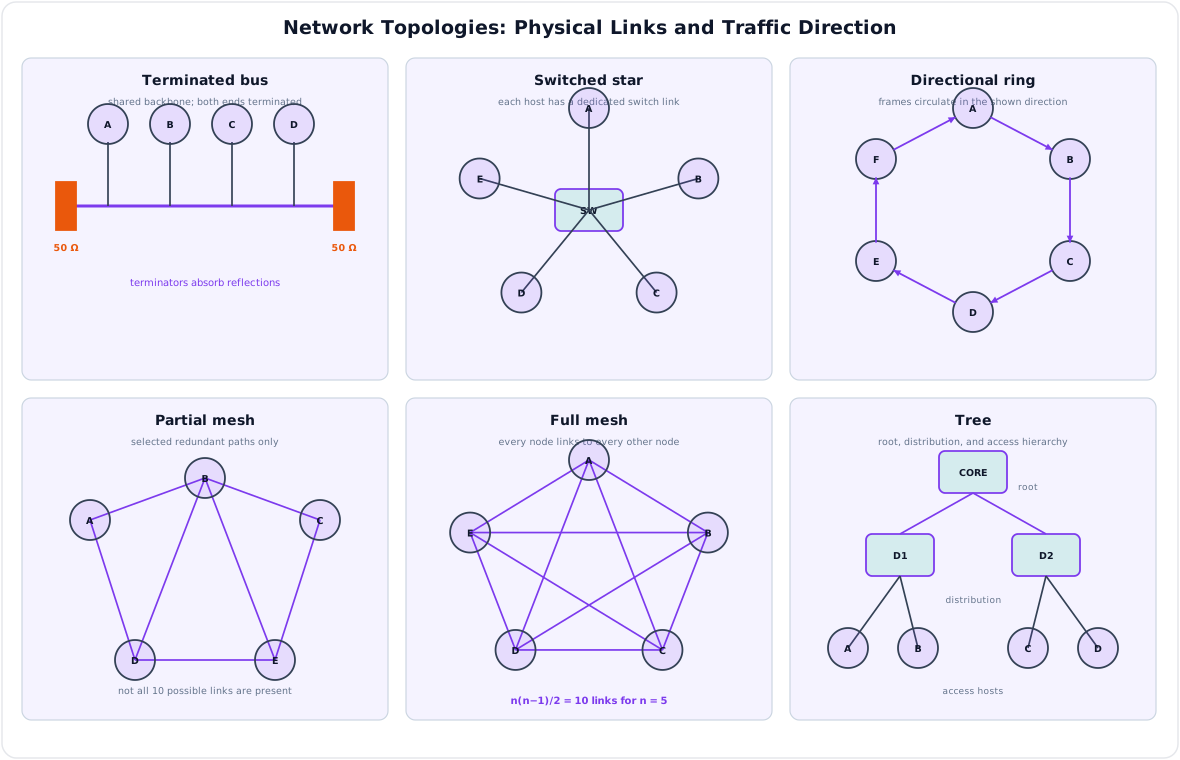
| Topology | Arrangement | Advantages | Failure domain and limitations |
|---|---|---|---|
| Bus | All stations tap one terminated backbone | Low cable cost and simple small installation | Backbone break or bad terminator can stop all nodes; shared medium has collisions and poor fault isolation |
| Star | Every station has a separate link to a central hub/switch | Easy addition, management and link-fault isolation | One spoke failure affects one node, but central-device/power failure affects the whole star |
| Ring | Each node has two neighbors in a closed loop; traffic follows the ring protocol | Orderly/predictable access and no central hub | One link/node can break a single ring; dual/counter-rotating rings add recovery at extra cost |
| Mesh | Nodes have several links; a full mesh connects every pair | Multiple paths, high availability and load sharing | Expensive ports/cabling, complex routing; full mesh of \(n\) nodes needs \(n(n-1)/2\) links |
Example: a modern office normally uses a switched star: disconnecting one PC cable affects only that PC, while redundant core switches and uplinks remove the central single point of failure. A WAN backbone often uses partial mesh because full mesh grows quadratically. Topology alone does not guarantee reliability; loops in Ethernet require spanning-tree or loop-prevention control, ring recovery needs protection switching, and shared bus traffic requires access control. Segmentation, redundant power/links and monitoring should align failure and security domains with service requirements.
Practice target: 8–9 minutes; draw/reference all four arrangements and state exactly what a link, backbone or central-node failure affects.
Model Answer — IP Addressing and Internet Naming/Application Protocols [5–10 marks]
5-mark answer and 10-mark extension
For 5 marks — write this
An IP address is a logical network-layer identifier used by routers to deliver packets to an interface. IPv4 has 32 bits, normally written as four decimal octets, for example 192.168.10.25. Historically, IPv4 used classful networks:
| Class | First octet | Default prefix | Historical purpose |
|---|---|---|---|
| A | 1–126 | /8 |
Very large unicast networks |
| B | 128–191 | /16 |
Medium unicast networks |
| C | 192–223 | /24 |
Small unicast networks |
| D | 224–239 | Not host addressing | Multicast |
| E | 240–255 | Not ordinary host addressing | Reserved/experimental |
127.0.0.0/8 is loopback and zero-valued ranges have special uses. Classful addressing is obsolete for allocation and routing; modern networks use CIDR notation address/prefix-length. A /n prefix identifies the first \(n\) network bits, and a traditional subnet has \(2^{32-n}-2\) usable host addresses, with /31 point-to-point and /32 host-route exceptions. Private space includes 10.0.0.0/8, 172.16.0.0/12 and 192.168.0.0/16.
DNS maps names to records such as A/AAAA addresses; a URL identifies a resource; HTTP/HTTPS transfers web requests and responses; and FTP supports remote file transfer.
Add for a 10-mark variant
These services operate in a layered protocol stack. Application data is carried by TCP or UDP/QUIC, placed in an IP packet, framed by Ethernet/Wi-Fi and transmitted as bits. At the receiver, each layer removes its header and delivers the payload upward.
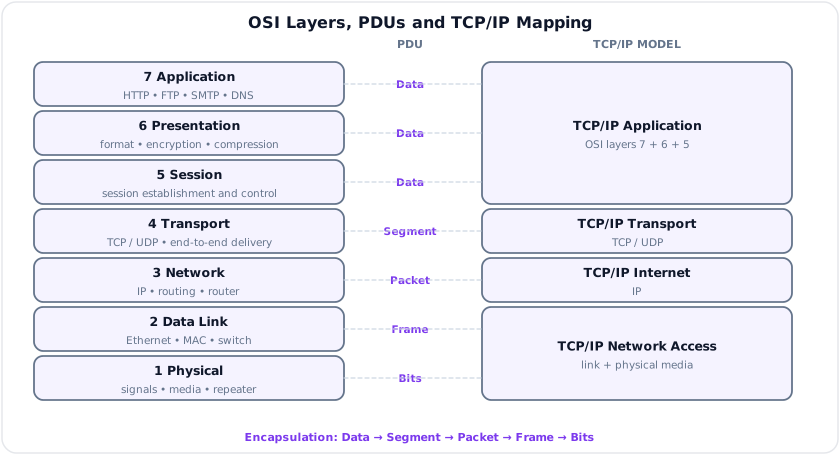
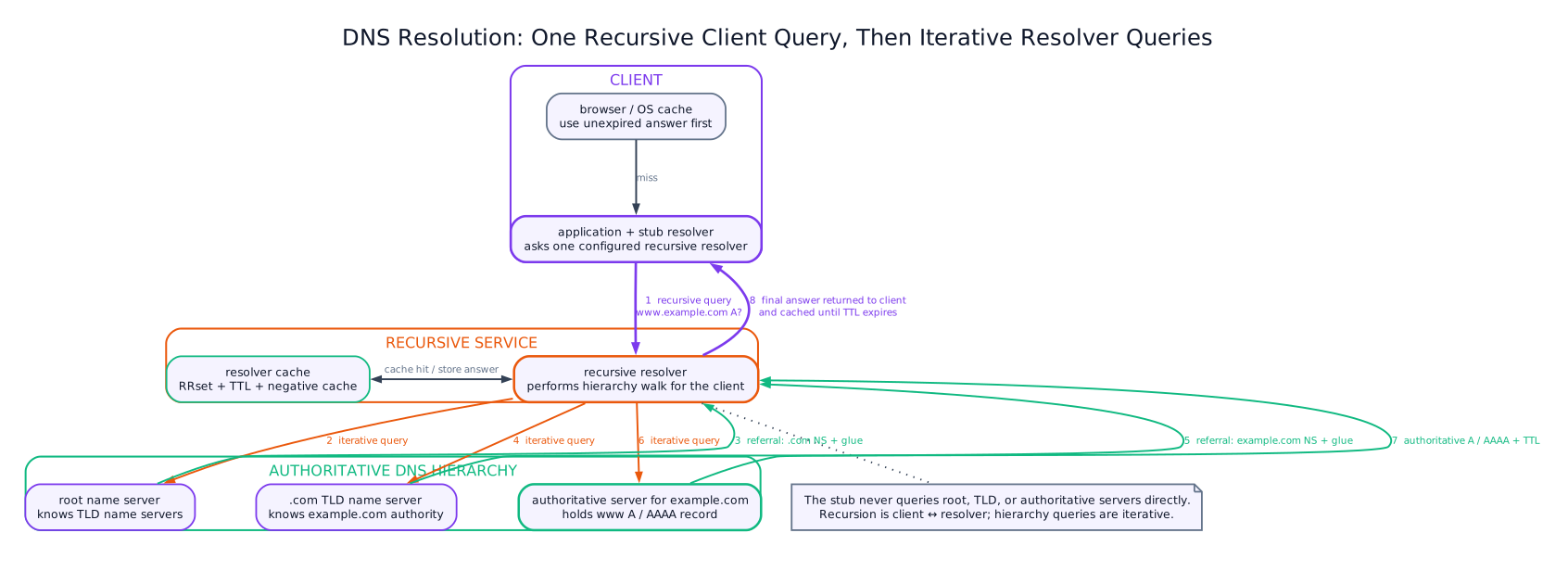
DNS resolution: the host's stub resolver sends one recursive query to its configured recursive resolver. If the answer is not cached, that resolver makes iterative queries: a root server refers it to the appropriate top-level-domain (TLD) server; the TLD server refers it to the domain's authoritative server; and the authoritative server returns the requested A, AAAA or other record. The resolver caches each response for its TTL and returns the final answer to the client. Root and TLD servers normally give referrals, not the host's final address.
A URL has the general field format
The scheme selects the protocol, DNS resolves the host, the optional port selects the server process, the path identifies a resource, the query supplies parameters and the fragment identifies a client-side section.
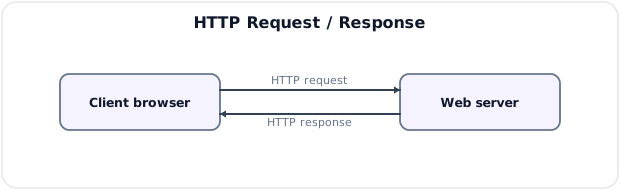
HTTP is a stateless application request/response protocol. A client sends a method, target, headers and optional body; the server returns a status code, headers and body. HTTPS adds TLS authentication, confidentiality and integrity. Typical methods are GET and POST, with status codes such as 200, 404 and 500.
FTP uses a control connection, conventionally TCP port 21, plus a separate active or passive data connection for listings and file contents; old active-mode data commonly originates from port 20. Basic FTP exposes credentials/data, so FTPS adds TLS. SFTP is a different protocol over SSH, normally port 22, not "secure FTP" mode of FTP.
Example: opening the URL above causes DNS resolution, a transport/TLS connection, an HTTP GET and a response; downloading through FTP instead uses its control/data channels. Limitations include finite IPv4 space/NAT, DNS cache poisoning, clear-text HTTP/FTP and server spoofing. CIDR, DNSSEC validation where deployed, HTTPS certificate verification, SFTP/FTPS, firewalls and least-privilege service accounts are appropriate controls.
Practice target: 9 minutes for the five-mark core or 18 minutes for the full answer; label classful addressing as historical and trace DNS through all four resolver/server roles.
Model Answer — Hub, Switch, and Router [5 marks]
Exam-ready answer
A hub is a physical-layer multiport repeater: bits arriving on one port are regenerated to every other port without inspecting addresses. A switch is mainly a data-link-layer bridge: it learns source MAC addresses per port and forwards a unicast Ethernet frame only toward the learned destination, while flooding unknown unicast and broadcast frames within the VLAN. A router is a network-layer device: it examines destination IP addresses, selects a next hop from its routing table, decrements packet lifetime and forwards between different IP networks.
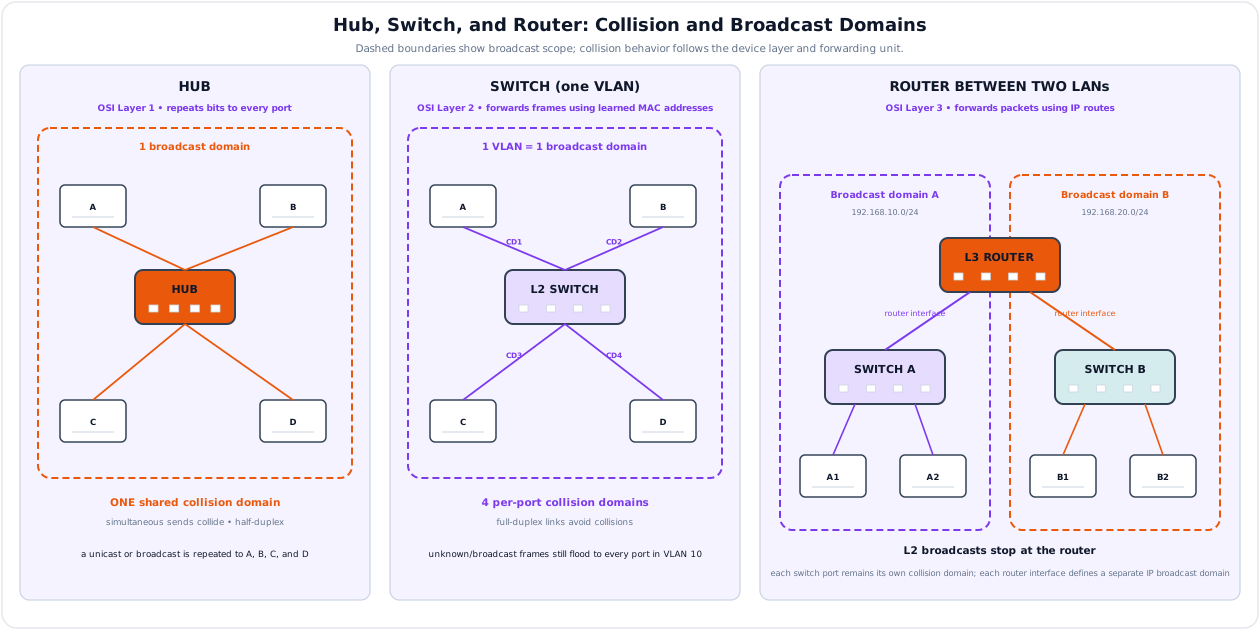
| Feature | Hub | Layer-2 switch | Router |
|---|---|---|---|
| Forwarding basis | None; repeat bits | MAC address table | IP prefix/routing table |
| Collision domains | One shared domain | One per switched port | One per interface/link |
| Broadcast domains | One | One per VLAN | Each routed interface is a separate domain |
| Typical use | Obsolete small/shared test segment | Connect hosts inside a LAN/VLAN | Connect LANs/VLANs to other networks/WAN |
Example: two PCs on the same VLAN exchange frames through a switch without using the default gateway. Traffic to another subnet is sent to the router's MAC address; the router removes the old link frame, routes the IP packet and creates a new frame on the outgoing interface.
A hub permits easy eavesdropping and half-duplex collisions. A switch improves capacity but does not stop a broadcast storm in one VLAN and may face MAC-flooding or loop attacks. A router bounds broadcasts and can apply ACL/firewall/NAT policy, but it adds forwarding/configuration overhead and can be a single point of failure. VLAN separation, port security, loop prevention, authenticated management, ACLs and redundant gateways are common controls.
Practice target: 8–9 minutes; state layer, address used, forwarding action, and exact collision/broadcast-domain behavior for each device.
Model Answer — Web, Email, and Print Servers [5 marks]
Exam-ready answer
A server is hardware or, more precisely, a continuously available software process that listens for requests and provides controlled resources to client programs. In the client-server model, a client locates the service, opens a protocol connection or sends a request, the server authenticates/validates it, performs the operation and returns a response.
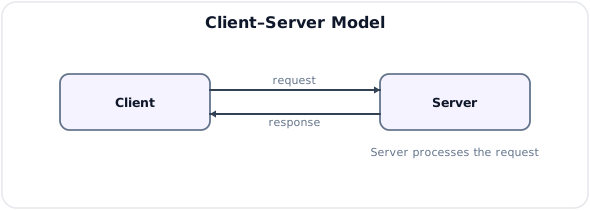
| Server | Main function | Protocols/operation | Example |
|---|---|---|---|
| Web server | Stores or generates web pages, files and API responses | HTTP on port 80; HTTPS/TLS commonly on 443 | Browser requests a customer self-care page from Nginx/Apache/application server |
| Email server | Accepts, relays, filters, stores and retrieves messages | SMTP sends/relays; IMAP synchronizes mailboxes; POP3 downloads mail | Sender server looks up recipient MX record and transfers mail by SMTP |
| Print server | Shares printers, accepts jobs, queues/spools them and reports status | IPP and vendor/legacy print protocols | Several office clients submit jobs that are serialized for one printer |
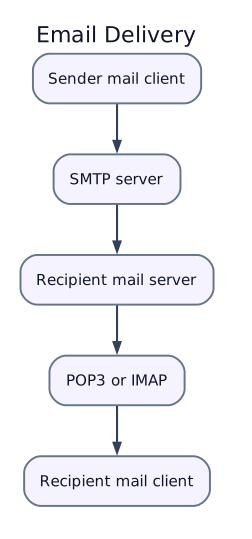
Process example: a web client resolves the server name, establishes TCP/TLS, sends GET /index.html, and receives an HTTP status, headers and content. Email instead follows client submission → sender SMTP server → recipient SMTP server → mailbox → recipient IMAP/POP client. A print server validates the user, converts or preserves job format, queues it, sends it when the device is ready and retains status/accounting information.
Central servers simplify administration, backup, access control and resource sharing, but create valuable targets and possible availability bottlenecks. Capacity planning, redundancy, patching, TLS, strong authentication, least-privilege service accounts, spam/malware filtering, printer quotas, network segmentation, logs and backups reduce overload, data leakage and service failure. A server protocol must not be exposed more widely than required.
Practice target: 8–9 minutes; define client-server operation and give function, protocol and one transaction for each of the three servers.
Syllabus Focus
- Internet and e-mail
- Web, DNS, IP, URL, HTTP, and FTP
- Routers and basic network devices
- Servers: web, e-mail, and printer servers
1. Computer Network Basics
Likely Exam Question (5 marks)
"Define computer network. Explain the advantages of networking."
A computer network is a collection of interconnected computers and devices that communicate and share resources using communication links and protocols.
Advantages of Networking
- Resource sharing: printer, storage, software, internet connection.
- File and data sharing between users and systems.
- Communication through e-mail, chat, VoIP, and video conferencing.
- Centralized administration and backup.
- Distributed processing and remote access.
- Improved reliability through redundancy.
Basic Network Components
| Component | Function |
|---|---|
| Host/node | Computer or device connected to network |
| NIC | Network interface card/controller for network connection |
| Transmission media | Wired or wireless path for signals |
| Switch | Connects devices in a LAN and forwards frames |
| Router | Connects different networks and forwards packets |
| Modem | Converts digital/analog or adapts to ISP link |
| Access point | Provides wireless LAN connectivity |
| Server | Provides services to clients |
2. Network Types
Networks are classified by geographical coverage, ownership, and purpose.
| Type | Full Form | Coverage | Example |
|---|---|---|---|
| PAN | Personal Area Network | Few meters | Bluetooth between phone and headset |
| LAN | Local Area Network | Room/building/campus | Office Ethernet/Wi-Fi |
| MAN | Metropolitan Area Network | City/metropolitan area | City fiber network |
| WAN | Wide Area Network | Country/world | Internet, telecom backbone |
LAN vs WAN
| Feature | LAN | WAN |
|---|---|---|
| Coverage | Small area | Large geographical area |
| Ownership | Usually private | Often telecom/ISP-operated links |
| Speed | High | Lower than LAN in many cases |
| Delay | Low | Higher |
| Example | Office network | Internet backbone |
3. Network Topologies
Topology is the physical or logical arrangement of network devices.
| Topology | Description | Advantages | Disadvantages |
|---|---|---|---|
| Bus | All devices share one backbone cable | Simple, cheap | Backbone failure stops network; collisions |
| Star | Devices connect to central switch/hub | Easy to manage; failure isolation | Central device is critical |
| Ring | Devices connected in circular path | Predictable access | Break affects network unless dual ring |
| Mesh | Devices have multiple interconnections | High reliability | Expensive and complex |
| Tree | Hierarchical star/bus combination | Scalable | Backbone/root failure affects branches |
Modern LANs commonly use star topology with switches.
4. Transmission Media
Guided Media
| Medium | Characteristics | Use |
|---|---|---|
| Twisted pair | Cheap, easy installation, limited distance | Ethernet LAN, telephone line |
| Coaxial cable | Better shielding than twisted pair | Cable TV, older Ethernet |
| Optical fiber | Very high bandwidth, low loss, immune to EMI | Backbone, FTTH, long-distance links |
Unguided Media
| Medium | Characteristics | Use |
|---|---|---|
| Radio wave | Omnidirectional, penetrates buildings | Wi-Fi, mobile communication |
| Microwave | Directional, line-of-sight | Point-to-point links, satellite uplink |
| Infrared | Short range, line-of-sight | Remote controls, short-range links |
5. Protocols and Layered Communication
Likely Exam Question (10 marks)
"Explain the TCP/IP model and functions of its layers."
A protocol is a set of rules that governs data communication between devices. It defines format, timing, addressing, error handling, and control.
OSI Reference Model
| Layer | Name | Main Function | Examples |
|---|---|---|---|
| 7 | Application | Network services to applications | HTTP, FTP, SMTP, DNS |
| 6 | Presentation | Data format, encryption, compression | SSL/TLS idea, JPEG, ASCII |
| 5 | Session | Session establishment and control | Login/session management |
| 4 | Transport | End-to-end delivery, reliability | TCP, UDP |
| 3 | Network | Logical addressing and routing | IP, ICMP |
| 2 | Data Link | Framing, MAC addressing, error detection | Ethernet, Wi-Fi |
| 1 | Physical | Transmission of bits over medium | Cables, radio, connectors |
TCP/IP Model
| TCP/IP Layer | Function | Protocols |
|---|---|---|
| Application | User services and application data | HTTP, FTP, SMTP, DNS, DHCP |
| Transport | End-to-end process communication | TCP, UDP |
| Internet | IP addressing and routing | IP, ICMP, ARP |
| Network access | Link and physical transmission | Ethernet, Wi-Fi, PPP |
TCP vs UDP
| Feature | TCP | UDP |
|---|---|---|
| Connection | Connection-oriented | Connectionless |
| Reliability | Reliable, acknowledgements, retransmission | Best effort |
| Ordering | Maintains order | No ordering guarantee |
| Speed/overhead | More overhead | Low overhead, faster |
| Use | Web, e-mail, FTP | DNS, streaming, VoIP, gaming |
6. Internet
The Internet is a global network of interconnected networks that uses TCP/IP protocols to exchange information.
Internet Services
| Service | Purpose | Common Protocol |
|---|---|---|
| Web browsing | Access web pages | HTTP/HTTPS |
| Electronic messaging | SMTP, POP3, IMAP | |
| File transfer | Transfer files | FTP/SFTP |
| Remote login | Access remote systems | SSH, Telnet |
| DNS | Name to IP resolution | DNS |
| VoIP/video | Real-time communication | RTP/SIP and related protocols |
Intranet and Extranet
| Term | Meaning |
|---|---|
| Internet | Public global network |
| Intranet | Private network within an organization using internet technologies |
| Extranet | Controlled private network access for external partners/customers |
7. IP Addressing
Likely Exam Question (10 marks)
"What is an IP address? Differentiate between IPv4 and IPv6."
An IP address is a logical address assigned to a device on an IP network. It identifies the source and destination of packets.
IPv4
IPv4 uses a 32-bit address written in dotted decimal notation.
Example:
Theoretical number of IPv4 addresses:
IPv6
IPv6 uses a 128-bit address written in hexadecimal groups separated by colons.
Example:
IPv4 vs IPv6
| Feature | IPv4 | IPv6 |
|---|---|---|
| Address length | 32 bits | 128 bits |
| Notation | Dotted decimal | Hexadecimal colon notation |
| Address space | Smaller | Very large |
| Header | Variable length | Simplified fixed base header |
| Broadcast | Supported | Replaced by multicast/anycast |
| NAT need | Common due to shortage | Less necessary |
Public and Private IP Addresses
| Type | Description | Example Range |
|---|---|---|
| Public IP | Globally routable on internet | ISP-assigned addresses |
| Private IP | Used inside private networks | 10.0.0.0/8, 172.16.0.0/12, 192.168.0.0/16 |
Subnet Mask
A subnet mask separates network portion and host portion of an IPv4 address.
Example:
8. DNS
Likely Exam Question (5 marks)
"What is DNS? Explain how domain name resolution works."
DNS (Domain Name System) translates human-readable domain names into IP addresses.
Example:
DNS Resolution Steps
Common DNS Records
| Record | Purpose |
|---|---|
| A | Maps domain to IPv4 address |
| AAAA | Maps domain to IPv6 address |
| CNAME | Alias for another domain name |
| MX | Mail server for domain |
| NS | Authoritative name server |
| TXT | Text information, SPF/DKIM verification |
9. URL and Web
A URL (Uniform Resource Locator) specifies the address of a resource on the internet.
Example:
Parts of a URL
| Part | Example | Meaning |
|---|---|---|
| Scheme/protocol | https |
Protocol used |
| Host/domain | www.example.com |
Server name |
| Port | 443 |
Service port |
| Path | /docs/page.html |
Resource location |
| Query | topic=ict |
Extra parameters |
| Fragment | network |
Section inside page |
Web
The World Wide Web (WWW) is an information system of interlinked hypertext documents and resources accessed through the internet using web browsers.
Web is not the same as internet:
| Internet | Web |
|---|---|
| Global network infrastructure | Service running over the internet |
| Uses many protocols | Mainly HTTP/HTTPS |
| Includes e-mail, FTP, DNS, VoIP | Includes websites and web applications |
10. HTTP and HTTPS
HTTP (HyperText Transfer Protocol) is an application-layer protocol used for communication between web clients and web servers.
HTTPS is HTTP secured using TLS encryption.
HTTP Request/Response
Common HTTP Methods
| Method | Use |
|---|---|
| GET | Retrieve resource |
| POST | Submit data to server |
| PUT | Replace/update resource |
| PATCH | Partially update resource |
| DELETE | Delete resource |
Common HTTP Status Codes
| Code | Meaning |
|---|---|
| 200 | OK |
| 301/302 | Redirect |
| 400 | Bad request |
| 401 | Unauthorized |
| 403 | Forbidden |
| 404 | Not found |
| 500 | Internal server error |
11. FTP and E-mail
FTP
FTP (File Transfer Protocol) is used to upload and download files between client and server.
| Protocol | Purpose | Common Port |
|---|---|---|
| FTP | File transfer, not encrypted by default | 20/21 |
| SFTP | Secure file transfer over SSH | 22 |
| FTPS | FTP secured with TLS | 990 or explicit TLS on 21 |
E-mail
E-mail allows electronic message exchange over networks.
| Protocol | Function |
|---|---|
| SMTP | Sends mail from client/server to mail server/server |
| POP3 | Downloads mail from server to client |
| IMAP | Synchronizes mail between server and clients |
E-mail path:
12. Routers and Network Devices
Likely Exam Question (5 marks)
"Differentiate between hub, switch, and router."
Router
A router connects different networks and forwards IP packets based on routing tables. It operates mainly at the network layer.
Functions of router:
- Connects LAN to WAN/internet.
- Selects best path for packets.
- Separates broadcast domains.
- Performs NAT in home/office networks.
- Can provide firewall and DHCP services.
Hub vs Switch vs Router
| Device | OSI Layer | Function | Collision/Broadcast Behavior |
|---|---|---|---|
| Hub | Physical | Repeats bits to all ports | One collision domain |
| Switch | Data link | Forwards frames using MAC address | Separate collision domains |
| Router | Network | Routes packets using IP address | Separates broadcast domains |
Gateway
A gateway connects networks using different protocols or architectures. In common home networks, the router acts as the default gateway to the internet.
13. Servers
A server is a computer or software system that provides services or resources to clients over a network.
Common Servers
| Server | Function |
|---|---|
| Web server | Hosts websites and responds to HTTP/HTTPS requests |
| E-mail server | Sends, receives, and stores e-mail |
| Printer server | Manages network printers and print queues |
| DNS server | Resolves domain names to IP addresses |
| File server | Stores and shares files |
| Database server | Provides database access to applications |
| DHCP server | Assigns IP addresses automatically |
Client-Server Model
Advantages:
- Centralized management.
- Better security and backup.
- Easier resource sharing.
- Scalable service delivery.
14. Network Security Basics
Even basic networking requires security controls.
| Control | Purpose |
|---|---|
| Firewall | Filters traffic based on rules |
| Authentication | Verifies user/device identity |
| Encryption | Protects data confidentiality |
| VPN | Secure tunnel over public network |
| Access control | Limits resource use to authorized users |
| Logging/monitoring | Detects suspicious activity |
15. Quick Comparisons
HTTP vs FTP
| Feature | HTTP | FTP |
|---|---|---|
| Main use | Web page/resource transfer | File upload/download |
| Default port | 80 | 20/21 |
| Secure version | HTTPS | SFTP/FTPS |
| Access pattern | Request/response web browsing | File management/transfer |
DNS vs IP Address
| Feature | DNS Name | IP Address |
|---|---|---|
| Form | Human-readable name | Numeric/logical address |
| Example | ntc.net.np |
202.x.x.x |
| Purpose | Easy identification | Actual packet delivery |
| Change | Can point to different IP | Tied to network/interface |
Web Server vs E-mail Server vs Printer Server
| Server | Provides | Common Protocol/Service |
|---|---|---|
| Web server | Web pages/apps | HTTP/HTTPS |
| E-mail server | Mail send/receive/store | SMTP, POP3, IMAP |
| Printer server | Shared printing | Print queue protocols |
Key Exam Points - Networking
- Internet is the global TCP/IP network; web is one service over the internet.
- DNS converts domain names into IP addresses.
- URL includes scheme, host, port, path, query, and fragment.
- HTTP is used for web transfer; HTTPS adds TLS security.
- FTP transfers files; SMTP sends mail; POP3/IMAP retrieve/synchronize mail.
- Router connects networks using IP addresses; switch connects LAN devices using MAC addresses.